Introduction
Most solar companies do not lose jobs because of weak engineering. They lose time, margin and customer trust in the gaps between departments. A lead sits in a salesperson’s phone. The quotation lives in a spreadsheet. The project manager rebuilds the same details after the customer says yes. Then the installation crew calls the office to ask which inverter was approved.
At Kode Karigar, we build Solar EPC Software for solar contractors, so we see this pattern often. The tools change from company to company, but the problem is the same: information moves from one person to the next, and every handover is a chance for something to go missing. This guide explains how to run leads, quotations, projects and installation teams through one solar company management system, and what to check before you choose one.
Why four separate tools quietly cost you money
A common setup looks like this: a lead sheet for sales, Excel for quotations, a task board for projects and a WhatsApp group for installers. Each tool works well enough on its own. The trouble starts when information has to cross from one to the next.
- Repeated data entry. Customer name, address and roof details get typed several times, and every repeat is a chance for a wrong number.
- Outdated quotes. The design changes after the site survey, but the project team keeps working from the first version.
- Late surprises. Installers hear about a change on the morning of the job instead of two days before.
- No clear status. Answering “where is this customer right now?” means asking three different people.
Using one system does not mean filling one giant form. It means one customer record, one price list and one status trail that every team can see and update.
Step 1: Manage solar leads before they go cold
Customers often compare two or three contractors at the same time, so a slow reply can end the conversation before it starts. Start by bringing every enquiry into one place, whether it comes from your website, a phone call, WhatsApp, a referral or an exhibition.
For each lead, record the details that actually help you qualify it: the source, location, average monthly electricity bill, roof type, whether the customer owns the property, and whether it is a home or a business. The electricity bill is especially useful because it gives you a rough idea of system size before anyone visits the site.
- Give every lead an owner and a dated next action, so nothing depends on someone remembering.
- Use clear stages such as New, Contacted, Site Survey Booked, Quotation Sent, Negotiation, Won and Lost.
- Ask salespeople to note why a lead was lost. After a few months, those reasons show you where pricing or follow up needs work.
Step 2: Build quotations from real site data
A quotation is only as reliable as the information behind it. When survey details such as roof area, shading, load, meter information and photos are attached to the lead, the person preparing the quote does not have to hunt for them.
- One product catalogue. Keep panels, inverters, mounting structures, cables and labour rates in a single price list, so every quote uses current prices.
- Version history. When a quote is revised, keep the earlier versions and note what changed and why.
- Margin visibility. Let the person approving the quote see cost and margin before it goes to the customer.
- A clean handover. When the customer accepts, the approved quote should turn into a project with its scope and bill of materials already attached.
This last point matters most. If someone has to rebuild the job from a PDF, the quotation stage has not really been connected to the rest of the business.
Step 3: Turn an accepted quote into a managed project
Once a quote is won, the project should start with customer details, system capacity, address and scope already filled in. From there, the project manager needs a view of milestones, materials, money and documents.
- Milestones. Typical ones include design approval, permits and utility approvals, procurement, delivery, installation, testing, commissioning and handover. Approval rules differ between countries and authorities, so make sure your milestones can be edited.
- Materials against stock. See what a project needs, what is already in the warehouse and what is reserved for other jobs, before a purchase order is raised.
- Payments. Link payment stages, such as advance, delivery and completion, to project milestones so finance and operations work from the same dates.
- Documents. Keep drawings, approvals, warranties and handover papers with the project instead of scattered across inboxes.
Step 4: Coordinate installation teams without endless phone calls
Field teams are where a disconnected process shows up fastest. If installers depend on calls and voice notes, small details get lost between the office and the roof.
- Assign crews by date, location and skill, and check for clashes before confirming a job.
- A job pack for each site. Give the crew the scope, approved material list, drawings, customer contact and checklist on their phone.
- Progress from the site. Let installers update status, upload photos, report issues and record materials used, all from the job itself.
- Use simple checklists for safety, mounting, wiring, testing and commissioning so quality does not depend on who is on the crew that day.
- Finish with a completion report, warranty documents and customer approval stored on the same record.
There is also a long term benefit. When actual material use is recorded against each job, your next quotation can be based on what installations really needed, not on guesses.
What changes when everything sits in one system
- Customer data: with separate tools it is retyped at each stage; with one system it is entered once and reused.
- Quotes: with separate tools they live in files that get copied and edited; with one system they are versioned and tied to the customer and the project.
- Project status: with separate tools it depends on updates from individuals; with one system it is visible to everyone who needs it.
- Site work: with separate tools it runs on calls and chat messages; with one system crews work from a shared job pack and report back on the same record.
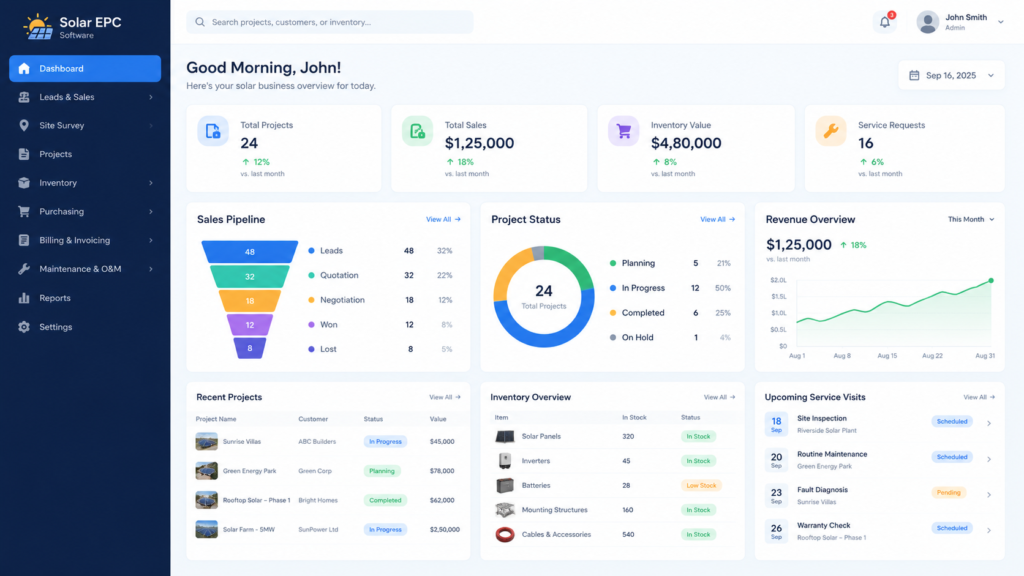
- Reporting: with separate tools numbers are pulled together by hand; with one system conversion, pending quotes and delayed projects can be seen in one place.
What to look for in a solar company management system
A general CRM can handle leads, but it often struggles once you need bills of materials, milestones and field teams. When you compare options, focus on how well the stages connect, not only on how many features are listed.
- Lead to quote to project conversion without retyping.
- Solar specific fields, such as system size in kW, panel and inverter details, and roof and site data.
- Inventory linked to projects, so material planning uses live stock.
- A mobile friendly view that installers will actually use on site.
- Role based access, so sales, finance, project managers and crews each see what they need.
- Flexible stages, so the software follows your process and local approval steps, not the other way around.
- Useful reports, such as quote conversion, pending follow ups, project delays and crew workload.
A practical way to start
Switching everything at once is rarely necessary. One workable approach is to move in stages while current jobs continue as they are.
- Week 1: Map your current stages and the fields you really use. Remove the ones nobody reads.
- Week 2: Load your product catalogue and price list, and import open leads.
- Week 3: Run all new leads and quotations through the system, while active projects finish the old way.
- Week 4: Bring in project tracking and installation teams, then review what needs adjusting.
Quick self check
If you answer yes to two or more of these, your process may be ready for a single connected system.
- Do you retype customer details after a quotation is accepted?
- Can you see the current status of every live project without calling anyone?
- Have installers ever arrived without the final approved material list?
- Do you know which quotations need a follow up today?
- Do you know how much of each material is reserved for live projects?

Conclusion
Growing a solar business is not only about winning more leads. It is about making sure each accepted job moves smoothly from sales to design, procurement, installation and handover. When your leads, quotations, projects and crews share one record, there is less rework, fewer surprises and a clearer picture of the business.
If you want to see how this works for a Solar EPC company, explore Kode Karigar’s Solar EPC Software or talk to our team about your current process.